How CARL Handles Popup Management
CARL includes a built-in popup manager that lets you create and deploy popups on any page without a plugin or third-party service. Popups are configured in the admin panel and written into the generated page file, so they load instantly with no external script required.
Popup Trigger Types
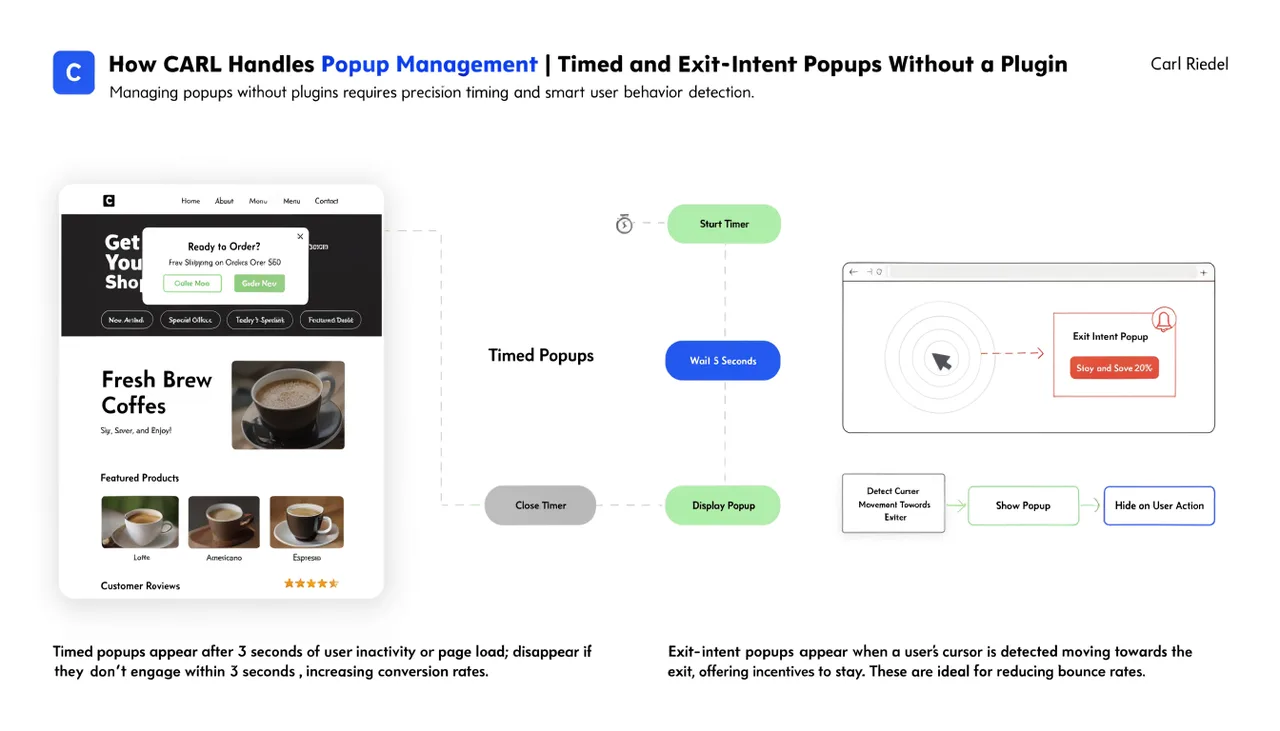
CARL supports two trigger types: timed and exit-intent. A timed popup appears after the visitor has been on the page for a specified number of seconds. An exit-intent popup fires when the visitor's cursor moves toward the top of the browser window, indicating they're about to leave. You set the trigger type and timing when building the popup, with no code required.
Creating a Popup
In the CARL admin panel, go to Popup Manager. Create a new popup and fill in the content: headline, body text, and an optional button with a label and URL. Set the trigger type and, for timed popups, the delay in seconds. Give the popup a name for identification and save it. The popup is now available to assign to any page on your site.
Assigning Popups to Pages
When editing a page in CARL, the popup field lets you select any saved popup to attach to that page. When you generate the page, CARL writes the popup HTML and trigger logic directly into the file. The popup runs from code already present in the page, with no dependency on an external popup service loading at runtime.
Frequency Control
CARL sets a cookie when a visitor dismisses a popup so it doesn't reappear on every visit. The cookie has a configurable duration, so you control how long a visitor is suppressed before the popup shows again. This keeps the experience from becoming intrusive while still re-engaging visitors who return after the suppression window has expired.
Updating Popups Across Pages
Like the CTA Builder, a single popup record can be assigned to multiple pages. Update the popup content once, then run a bulk regenerate to push the change across every page that uses it. If you want to remove a popup from all pages at once, clear the popup assignment and regenerate. No page-by-page editing required.