How to Create a Page in CARL
Creating a page in CARL is a linear process: fill in the fields, click Generate, and a finished PHP file lands on your server. There's no draft mode to navigate, no publish/update confusion, and no plugin adding fields you didn't ask for. You fill in what matters, generate the file, and the page is live.
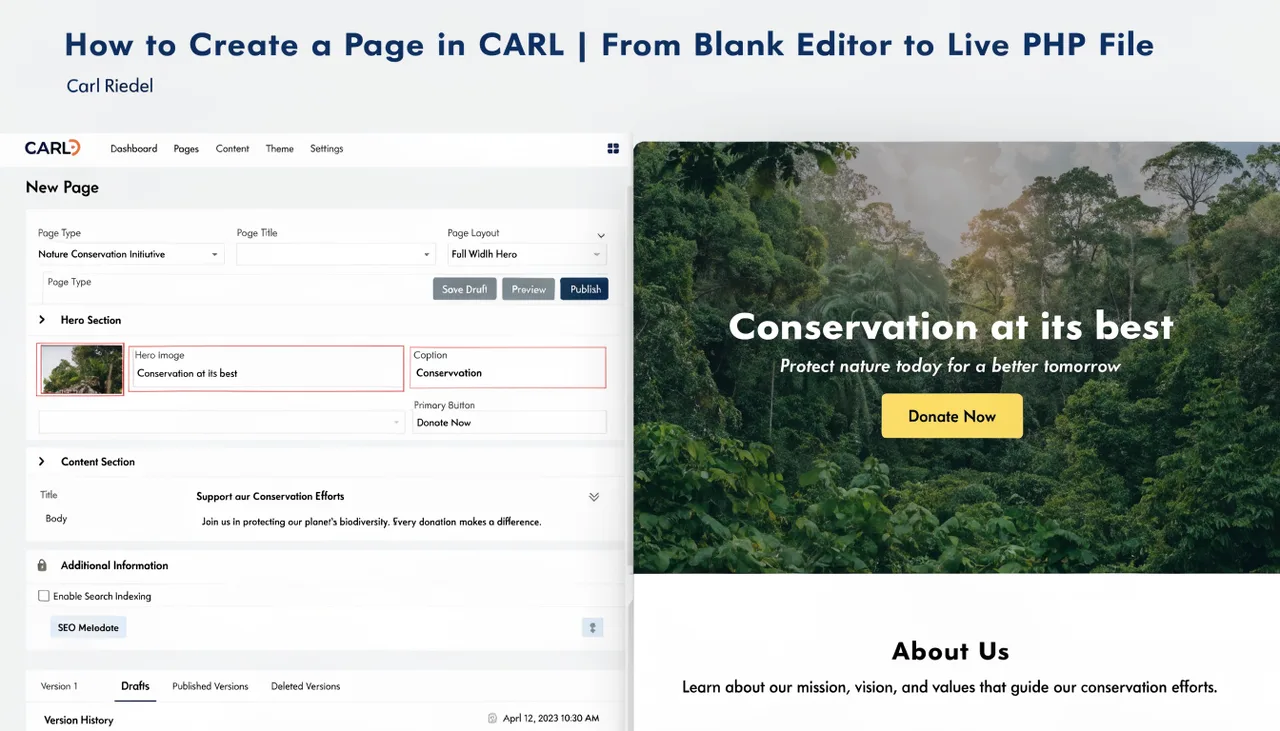
Open the Page Editor
From the CARL admin panel, go to Pages and click Add New Page. The page editor opens with a set of fields organized into two areas: the main content fields and the SEO/meta fields. Everything that ends up in the published PHP file gets set here.
The Core Fields
The Title field sets the page's </code> tag and is what appears in browser tabs and search results. The H1 field is separate, so your search-optimized title and your on-page heading can differ if you need them to. Fill both deliberately: the title is for Google, the H1 is for the reader arriving on the page.</p>
<p>The Slug field sets the filename. If you type <code>my-page</code>, CARL generates <code>my-page.php</code>. The Directory field sets where that file is placed on your server. A slug of <code>best-php-cms</code> with a directory of <code>blog</code> produces a file at <code>public_html/blog/best-php-cms.php</code>, accessible at <code>yourdomain.com/blog/best-php-cms.php</code>.</p>
<p>The Template field sets which layout the page uses. CARL ships with a Bootstrap full-width template, and you can <a href="/wiki/page-management/how-to-build-a-custom-template.php">build custom templates</a> for different page types. Whichever template you assign, its structure is baked into the generated file at publish time.</p>
<h2>The Content Field</h2>
<p>The main content area accepts HTML. You write or paste your content directly, with full control over the markup. There's no block editor abstracting things behind a visual interface. What you enter in the content field appears in the generated file, with nothing added or removed by a plugin.</p>
<h2>The Meta Fields</h2>
<p>Below the main content, you'll find fields for the meta description, canonical URL, and Open Graph tags. CARL writes these directly into the <code><head></code> of the generated file. You can also use the AI Schema Generator to produce JSON-LD structured data for the page, which gets embedded in the same file at generation time.</p>
<h2>Generating the Page</h2>
<p>When you click Generate, CARL takes everything in the editor, runs it through the assigned template, and writes a complete PHP file to the directory you specified. The file is immediately accessible at its URL. There's no cache to warm, no CDN to purge, and no propagation delay. The file exists on disk, and your server serves it.</p>
<p>If you go back and edit the page later, clicking Generate again overwrites the existing file with the updated version. The old file is replaced. The URL stays the same. That's the full cycle: create, generate, edit, regenerate.</p>
<div class="fbw-widget"
id="fbw_635243ef"
data-ajax="https://www.carlriedel.com/admin/modules/feedback/ajax/vote.php"
data-url="https://www.carlriedel.com/wiki/page-management/how-to-create-a-page.php"
style="--fbw-active-color:#ffb74d;--fbw-active-bg:#fff3e0">
<p class="fbw-title">What do you think?</p>
<p class="fbw-subtitle">
<span class="fbw-total">0</span>
Responses </p>
<div class="fbw-buttons">
<button class="fbw-btn"
data-type="upvote"
aria-label="Upvote"
aria-pressed="false">
<span class="fbw-emoji">👍</span>
<span class="fbw-label">Upvote</span>
<span class="fbw-count" data-count="upvote">0</span>
</button>
<button class="fbw-btn"
data-type="funny"
aria-label="Funny"
aria-pressed="false">
<span class="fbw-emoji">😆</span>
<span class="fbw-label">Funny</span>
<span class="fbw-count" data-count="funny">0</span>
</button>
<button class="fbw-btn"
data-type="love"
aria-label="Love"
aria-pressed="false">
<span class="fbw-emoji">😍</span>
<span class="fbw-label">Love</span>
<span class="fbw-count" data-count="love">0</span>
</button>
<button class="fbw-btn"
data-type="angry"
aria-label="Angry"
aria-pressed="false">
<span class="fbw-emoji">😤</span>
<span class="fbw-label">Angry</span>
<span class="fbw-count" data-count="angry">0</span>
</button>
<button class="fbw-btn"
data-type="sad"
aria-label="Sad"
aria-pressed="false">
<span class="fbw-emoji">😢</span>
<span class="fbw-label">Sad</span>
<span class="fbw-count" data-count="sad">0</span>
</button>
</div>
</div>
<style>
.fbw-widget {
--fbw-active-color: #ffb74d;
--fbw-active-bg: #fff3e0;
font-family: -apple-system, BlinkMacSystemFont, 'Segoe UI', Roboto, sans-serif;
text-align: center;
padding: 24px 16px 28px;
margin: 32px 0 16px;
border-top: 1px solid #e8e8e8;
}
.fbw-title { font-size: 1.15rem; font-weight: 700; color: #1a1a1a; margin: 0 0 4px; }
.fbw-subtitle { font-size: 0.85rem; color: #888; margin: 0 0 20px; }
.fbw-buttons { display: flex; justify-content: center; gap: 8px; flex-wrap: wrap; }
.fbw-btn {
display: flex; flex-direction: column; align-items: center; gap: 4px;
background: none; border: 2px solid transparent; border-radius: 12px;
padding: 10px 16px; cursor: pointer; min-width: 68px; font-family: inherit;
transition: background .15s, border-color .15s, transform .1s;
}
.fbw-btn:hover { background: #f5f5f5; }
.fbw-btn:active { transform: scale(0.93); }
.fbw-btn:disabled { opacity: 0.65; cursor: wait; }
.fbw-btn--active { background: var(--fbw-active-bg); border-color: var(--fbw-active-color); }
.fbw-emoji { font-size: 2rem; line-height: 1; display: block; transition: transform .2s; }
.fbw-btn:hover .fbw-emoji { transform: scale(1.15); }
.fbw-label { font-size: 0.72rem; color: #555; font-weight: 500; }
.fbw-count { font-size: 0.78rem; font-weight: 700; color: #333; }
.fbw-btn--active .fbw-label,
.fbw-btn--active .fbw-count { color: #e65100; }
@keyframes fbw-pulse {
0% { transform: scale(1); }
40% { transform: scale(1.35); }
70% { transform: scale(0.9); }
100% { transform: scale(1); }
}
.fbw-btn--pulse .fbw-emoji { animation: fbw-pulse 0.4s ease forwards; }
</style>
<script>
(function () {
'use strict';
var widget = document.getElementById('fbw_635243ef');
if (!widget) return;
widget.addEventListener('click', function (e) {
var btn = e.target.closest('.fbw-btn');
if (!btn || btn.disabled) return;
var type = btn.dataset.type;
var ajax = widget.dataset.ajax;
var url = widget.dataset.url;
var hp = widget.querySelector('.fbw-hp');
widget.querySelectorAll('.fbw-btn').forEach(function (b) { b.disabled = true; });
var body = new FormData();
body.append('vote_type', type);
body.append('page_url', url);
body.append('fbw_website', hp ? hp.value : '');
fetch(ajax, { method: 'POST', body: body, headers: { 'X-Requested-With': 'XMLHttpRequest' } })
.then(function (r) { return r.json(); })
.then(function (data) {
if (!data.success) { console.warn('Feedback Widget:', data.error); return; }
Object.keys(data.counts).forEach(function (t) {
var el = widget.querySelector('[data-count="' + t + '"]');
if (el) el.textContent = data.counts[t];
});
var total = Object.values(data.counts).reduce(function (a, b) { return a + b; }, 0);
var totalEl = widget.querySelector('.fbw-total');
if (totalEl) {
var sub = totalEl.parentElement;
if (sub) sub.textContent = total + (total === 1 ? ' Response' : ' Responses');
}
widget.querySelectorAll('.fbw-btn').forEach(function (b) {
var isActive = b.dataset.type === data.your_vote;
b.classList.toggle('fbw-btn--active', isActive);
b.setAttribute('aria-pressed', isActive ? 'true' : 'false');
if (isActive) {
b.classList.remove('fbw-btn--pulse');
void b.offsetWidth;
b.classList.add('fbw-btn--pulse');
} else {
b.classList.remove('fbw-btn--pulse');
}
});
})
.catch(function (err) { console.error('Feedback Widget error:', err); })
.finally(function () {
widget.querySelectorAll('.fbw-btn').forEach(function (b) { b.disabled = false; });
});
});
}());
</script>
</article>
</div>
<!-- Sidebar column -->
<div class="col-md-4">
<div class="position-sticky" style="top: 2rem">
<!-- search_bar.txt -->
<div class="sidebar-search mb-4">
<h5 style="font-size:.85rem;font-weight:700;text-transform:uppercase;letter-spacing:.5px;margin-bottom:10px;">
Search
</h5>
<form method="GET" action="/search.php" role="search">
<div style="display:flex;gap:6px;">
<input type="text"
name="q"
placeholder="Search articles..."
value=""
autocomplete="off"
style="flex:1;padding:7px 10px;border:1px solid var(--bs-border-color);border-radius:6px;font-size:.875rem;background:transparent;color:inherit;">
<button type="submit"
style="background:var(--bs-primary);color:#fff;border:none;border-radius:6px;padding:7px 12px;cursor:pointer;display:flex;align-items:center;">
<svg width="15" height="15" fill="none" viewBox="0 0 24 24"
stroke="currentColor" stroke-width="2.5">
<path stroke-linecap="round" stroke-linejoin="round"
d="M21 21l-4.35-4.35M17 11A6 6 0 115 11a6 6 0 0112 0z"/>
</svg>
</button>
</div>
</form>
</div> <!-- carl_signup_form.txt -->
<div id="carl-sf-e3793a" style="background:#fff;border:1px solid #dee2e6;border-radius:8px;padding:24px;margin-bottom:1rem;">
<h4 style="color:#1a1a1a;font-size:1.1rem;font-weight:700;margin:0 0 4px;">Free Membership</h4>
<p style="font-size:.875rem;color:#666;margin:0 0 16px;">It's free. Log in instantly.</p>
<div class="carl-sf-form">
<form onsubmit="carlSF(event,'carl-sf-e3793a')">
<input type="text" name="_hp" style="display:none!important;" tabindex="-1" autocomplete="off">
<input type="hidden" name="_form" value="sidebar_carl">
<input type="text" name="first_name" placeholder="First Name" class="form-control mb-2" autocomplete="given-name">
<input type="email" name="email" placeholder="Email Address" class="form-control mb-2" required autocomplete="email">
<button type="submit" class="btn btn-success w-100">Let me in!</button>
<p style="font-size:.75rem;color:#888;text-align:center;margin-top:8px;">We won't send you spam. Unsubscribe at any time.</p>
<div id="carl-sf-e3793a-err" style="color:#c0392b;font-size:.825rem;margin-top:6px;display:none;"></div>
</form>
</div>
<div id="carl-sf-e3793a-ok" style="display:none;text-align:center;padding:12px 0;">
<p style="color:#2d8a4e;font-weight:600;margin:0;">You're in! Check your inbox.</p>
</div>
</div>
<script>
function carlSF(e, id) {
e.preventDefault();
var form = e.target;
var btn = form.querySelector('button');
var errEl = document.getElementById(id + '-err');
errEl.style.display = 'none';
btn.disabled = true;
btn.textContent = 'Sending…';
var data = new FormData(form);
data.append('_ajax', '1');
data.append('_source', window.location.pathname);
var btnLabel = "Let me in!";
fetch('/admin/modules/subscribers/signup.php', { method: 'POST', body: data })
.then(function(r){ return r.json(); })
.then(function(res) {
if (res.ok) {
document.querySelector('#' + id + ' .carl-sf-form').style.display = 'none';
document.getElementById(id + '-ok').style.display = 'block';
} else {
errEl.textContent = res.message || 'Something went wrong. Please try again.';
errEl.style.display = 'block';
btn.disabled = false;
btn.textContent = btnLabel;
}
})
.catch(function() {
errEl.textContent = 'Connection error. Please try again.';
errEl.style.display = 'block';
btn.disabled = false;
btn.textContent = btnLabel;
});
}
</script> <div>
<h4 class="fst-italic">Related Posts</h4>
<ul class="list-unstyled">
<li>
<a class="d-flex flex-column flex-lg-row gap-3 align-items-start align-items-lg-center py-3 link-body-emphasis text-decoration-none border-top"
href="/wiki/page-management/how-carls-preview-system-works.php">
<img width="35%" src="https://carlriedel.com/images/how-carl-s-preview-system-works-check-your-page-before-it-go-1780331874.webp" alt="How CARL's Preview System Works | Check Your Page Before It Goes Live | Carl Riedel" style="object-fit:cover;border-radius:4px;">
<div class="col-lg-8">
<h6 class="mb-0">How CARL's Preview System Works | Check Your Page Before It Goes Live | Carl Riedel</h6>
</div>
</a>
</li>
<li>
<a class="d-flex flex-column flex-lg-row gap-3 align-items-start align-items-lg-center py-3 link-body-emphasis text-decoration-none border-top"
href="/wiki/page-management/how-to-bulk-regenerate-pages.php">
<img width="35%" src="https://carlriedel.com/images/how-to-bulk-regenerate-pages-in-carl-update-every-page-on-yo-1780331600.webp" alt="How to Bulk-Regenerate Pages in CARL | Update Every Page on Your Site in One Pass | Carl Riedel" style="object-fit:cover;border-radius:4px;">
<div class="col-lg-8">
<h6 class="mb-0">How to Bulk-Regenerate Pages in CARL | Update Every Page on Your Site in One Pass | Carl Riedel</h6>
</div>
</a>
</li>
<li>
<a class="d-flex flex-column flex-lg-row gap-3 align-items-start align-items-lg-center py-3 link-body-emphasis text-decoration-none border-top"
href="/wiki/page-management/how-to-use-the-head-snippet-field.php">
<img width="35%" src="https://carlriedel.com/images/how-to-use-the-head-snippet-field-in-carl-add-custom-code-to-1780328278.webp" alt="How to Use the Head Snippet Field in CARL | Add Custom Code to Any Page's Head Section | Carl Riedel" style="object-fit:cover;border-radius:4px;">
<div class="col-lg-8">
<h6 class="mb-0">How to Use the Head Snippet Field in CARL | Add Custom Code to Any Page's Head Section | Carl Riedel</h6>
</div>
</a>
</li>
<li>
<a class="d-flex flex-column flex-lg-row gap-3 align-items-start align-items-lg-center py-3 link-body-emphasis text-decoration-none border-top"
href="/wiki/page-management/how-to-use-the-php-snippet-field.php">
<img width="35%" src="https://carlriedel.com/images/how-to-use-the-php-snippet-field-in-carl-add-custom-php-logi-1780327527.webp" alt="How to Use the PHP Snippet Field in CARL | Add Custom PHP Logic to Any Page | Carl Riedel" style="object-fit:cover;border-radius:4px;">
<div class="col-lg-8">
<h6 class="mb-0">How to Use the PHP Snippet Field in CARL | Add Custom PHP Logic to Any Page | Carl Riedel</h6>
</div>
</a>
</li>
<li>
<a class="d-flex flex-column flex-lg-row gap-3 align-items-start align-items-lg-center py-3 link-body-emphasis text-decoration-none border-top"
href="/wiki/page-management/how-carl-handles-url-slugs-and-directories.php">
<img width="35%" src="https://carlriedel.com/images/how-carl-handles-url-slugs-and-directories-clean-urls-built--1780327029.webp" alt="How CARL Handles URL Slugs and Directories | Clean URLs Built Into Every Page | Carl Riedel" style="object-fit:cover;border-radius:4px;">
<div class="col-lg-8">
<h6 class="mb-0">How CARL Handles URL Slugs and Directories | Clean URLs Built Into Every Page | Carl Riedel</h6>
</div>
</a>
</li>
<li>
<a class="d-flex flex-column flex-lg-row gap-3 align-items-start align-items-lg-center py-3 link-body-emphasis text-decoration-none border-top"
href="/wiki/page-management/how-to-build-a-custom-template.php">
<img width="35%" src="https://carlriedel.com/images/how-to-build-a-custom-template-in-carl-full-layout-control-w-1780326559.webp" alt="How to Build a Custom Template in CARL | Full Layout Control Without a Theme System | Carl Riedel" style="object-fit:cover;border-radius:4px;">
<div class="col-lg-8">
<h6 class="mb-0">How to Build a Custom Template in CARL | Full Layout Control Without a Theme System | Carl Riedel</h6>
</div>
</a>
</li>
<li>
<a class="d-flex flex-column flex-lg-row gap-3 align-items-start align-items-lg-center py-3 link-body-emphasis text-decoration-none border-top"
href="/wiki/page-management/how-carls-page-templates-work.php">
<img width="35%" src="https://carlriedel.com/images/how-carl-s-page-templates-work-separate-your-layout-from-you-1780325344.webp" alt="How CARL's Page Templates Work | Separate Your Layout from Your Content | Carl Riedel" style="object-fit:cover;border-radius:4px;">
<div class="col-lg-8">
<h6 class="mb-0">How CARL's Page Templates Work | Separate Your Layout from Your Content | Carl Riedel</h6>
</div>
</a>
</li>
<li>
<a class="d-flex flex-column flex-lg-row gap-3 align-items-start align-items-lg-center py-3 link-body-emphasis text-decoration-none border-top"
href="/wiki/page-management/how-to-schedule-a-page-for-future-publishing.php">
<img width="35%" src="https://carlriedel.com/images/how-to-schedule-a-page-for-future-publishing-set-it-and-let--1780324978.webp" alt="How to Schedule a Page for Future Publishing | Set It and Let CARL Publish Automatically | Carl Riedel" style="object-fit:cover;border-radius:4px;">
<div class="col-lg-8">
<h6 class="mb-0">How to Schedule a Page for Future Publishing | Set It and Let CARL Publish Automatically | Carl Riedel</h6>
</div>
</a>
</li>
</ul>
</div>
</div>
</div>
</div>
</main>
<!-- Site footer -->
<!-- footer_include.txt — carlriedel.com -->
<footer class="py-5 bg-body-tertiary" style="color:#fff !important;">
<div class="container">
<div class="row g-4">
<!-- Column 1: Brand -->
<div class="col-12 col-lg-3 text-center text-lg-start">
<a href="/">
<img src="/images/footer-logo-white.webp" alt="C.A.R.L. CMS - Logo White" class="mb-3">
</a>
<p style="color:#ccc;line-height:1.6;">
Content Automation Ranking Launchpad.<br>
Fast, secure websites. No WordPress required.
</p>
<p style="color:#aaa;">
This site is built on <a href="https://carlriedel.com" style="color:#fff !important;">C.A.R.L</a>
</p>
<p style="color:#aaa;">© 2026 Carl Riedel. All rights reserved.</p>
</div>
<!-- Column 2: Resources + C.A.R.L -->
<div class="col-6 col-lg">
<h6 style="color:#fff;font-size:1.1rem;font-weight:700;letter-spacing:.08em;text-transform:uppercase;margin-bottom:14px;">Resources</h6>
<ul style="list-style:none;padding:0;margin:0 0 20px;">
<li style="margin-bottom:10px;"><a href="/use-cases/" style="color:#ccc !important;text-decoration:none;">Use Cases</a></li>
<li style="margin-bottom:10px;"><a href="/features/" style="color:#ccc !important;text-decoration:none;">Features</a></li>
<li style="margin-bottom:10px;"><a href="/videos/" style="color:#ccc !important;text-decoration:none;">Videos</a></li>
<li style="margin-bottom:10px;"><a href="/news/" style="color:#ccc !important;text-decoration:none;">Company News</a></li>
</ul>
<h6 style="color:#fff;font-size:1.1rem;font-weight:700;letter-spacing:.08em;text-transform:uppercase;margin-bottom:14px;">C.A.R.L</h6>
<ul style="list-style:none;padding:0;margin:0;">
<li style="margin-bottom:10px;"><a href="/autopost.php" style="color:#ccc !important;text-decoration:none;">AutoPost</a></li>
<li style="margin-bottom:10px;"><a href="/pricing.php" style="color:#ccc !important;text-decoration:none;">Pricing</a></li>
<li style="margin-bottom:10px;"><a href="/support.php" style="color:#ccc !important;text-decoration:none;">Support</a></li>
<li style="margin-bottom:10px;"><a href="/members/login.php" style="color:#ccc !important;text-decoration:none;">Members Login</a></li>
<li style="margin-bottom:0;"><a href="/members/register.php" style="color:#3fb950 !important;text-decoration:none;font-weight:600;">🆕 Get Free Access</a></li>
</ul>
</div>
<!-- Column 3: Wiki A-I -->
<div class="col-6 col-lg">
<h6 style="color:#fff;font-size:1.1rem;font-weight:700;letter-spacing:.08em;text-transform:uppercase;margin-bottom:14px;"><a href="/wiki/" style="color:#fff !important;text-decoration:none;">Wiki</a></h6>
<ul style="list-style:none;padding:0;margin:0;">
<li style="margin-bottom:10px;"><a href="/wiki/analytics/" style="color:#ccc !important;text-decoration:none;">Analytics</a></li>
<li style="margin-bottom:10px;"><a href="/wiki/architecture/" style="color:#ccc !important;text-decoration:none;">Architecture</a></li>
<li style="margin-bottom:10px;"><a href="/wiki/content/" style="color:#ccc !important;text-decoration:none;">Content and Media</a></li>
<li style="margin-bottom:10px;"><a href="/wiki/conversion-tools/" style="color:#ccc !important;text-decoration:none;">Conversion Tools</a></li>
<li style="margin-bottom:10px;"><a href="/wiki/downloads/" style="color:#ccc !important;text-decoration:none;">Downloads</a></li>
<li style="margin-bottom:10px;"><a href="/wiki/email-subscribers/" style="color:#ccc !important;text-decoration:none;">Email and Subscribers</a></li>
<li style="margin-bottom:0;"><a href="/wiki/includes/" style="color:#ccc !important;text-decoration:none;">Includes System</a></li>
</ul>
</div>
<!-- Column 4: Wiki I-S (continued) -->
<div class="col-6 col-lg">
<div style="height:calc(1.1rem + 14px + 14px);"></div>
<ul style="list-style:none;padding:0;margin:0;">
<li style="margin-bottom:10px;"><a href="/wiki/installation/" style="color:#ccc !important;text-decoration:none;">Installation</a></li>
<li style="margin-bottom:10px;"><a href="/wiki/link-tracking/" style="color:#ccc !important;text-decoration:none;">Link Tracking</a></li>
<li style="margin-bottom:10px;"><a href="/wiki/members/" style="color:#ccc !important;text-decoration:none;">Members Area</a></li>
<li style="margin-bottom:10px;"><a href="/wiki/page-management/" style="color:#ccc !important;text-decoration:none;">Page Management</a></li>
<li style="margin-bottom:10px;"><a href="/wiki/seo/" style="color:#ccc !important;text-decoration:none;">SEO</a></li>
<li style="margin-bottom:0;"><a href="/wiki/site-management/" style="color:#ccc !important;text-decoration:none;">Site Management</a></li>
<li style="margin-bottom:0;"><a href="/wiki/themes/" style="color:#ccc !important;text-decoration:none;">Themes</a></li>
</ul>
</div>
<!-- Column 5: News + Company -->
<div class="col-6 col-lg">
<h6 style="color:#fff;font-size:1.1rem;font-weight:700;letter-spacing:.08em;text-transform:uppercase;margin-bottom:14px;">News</h6>
<ul style="list-style:none;padding:0;margin:0 0 20px;">
<li style="margin-bottom:10px;"><a href="/news/" style="color:#ccc !important;text-decoration:none;">All Press Releases →</a></li>
</ul>
<h6 style="color:#fff;font-size:1.1rem;font-weight:700;letter-spacing:.08em;text-transform:uppercase;margin-bottom:14px;">Company</h6>
<ul style="list-style:none;padding:0;margin:0;">
<li style="margin-bottom:10px;"><a href="/about.php" style="color:#ccc !important;text-decoration:none;">About</a></li>
<li style="margin-bottom:10px;"><a href="/contact.php" style="color:#ccc !important;text-decoration:none;">Contact</a></li>
<li style="margin-bottom:10px;"><a href="/privacy.php" style="color:#ccc !important;text-decoration:none;">Privacy</a></li>
<li style="margin-bottom:10px;"><a href="/terms.php" style="color:#ccc !important;text-decoration:none;">Terms</a></li>
<li style="margin-bottom:10px;"><a href="/version.php" style="color:#ccc !important;text-decoration:none;">Version</a></li>
<li style="margin-bottom:0;"><a href="/rss.xml" style="color:#ccc !important;text-decoration:none;">RSS Feed</a></li>
</ul>
</div>
</div>
<!-- Back to top -->
<div class="row">
<div class="col-12 text-center" style="border-top:1px solid #333;padding-top:20px;margin-top:24px;">
<a href="#" style="color:#ccc !important;text-decoration:none;">↑ Back to top</a>
</div>
</div>
</div>
</footer> <!-- Bootstrap 5.3.3 JS (MIT License) -->
<script src="https://cdn.jsdelivr.net/npm/bootstrap@5.3.3/dist/js/bootstrap.bundle.min.js"></script>
</body>
</html>
